
Screenshots



App details
- Version
- 2.0.1.1
- Size
- 1.86 MB
- Updated
- March 21, 2025
- Requires
- Windows XP
- Language
- English
- License
- Free
- Developer
- Spacejock Software
- Category
- Windows OS
SoftPas in:
This product is also available in the following languages:
About yBook
Download yBook – Free Lightweight eBook Reader for Windows, Mac & Mobile
Overview – What yBook Brings to Your Digital Library
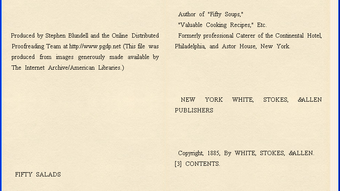
yBook positions itself as the bridge between classic paperback comfort and modern e‑book convenience. Built as a free, lightweight application, it lets you pull e‑books from a variety of sources—direct URLs, local folders, or even public domain repositories like Project Gutenberg—and renders them on a paper‑like background that mimics the look and feel of a printed page. The interface is intentionally minimal: a single click flips the page, while subtle visual cues such as line spacing and margin adjustments keep the reading experience gentle on the eyes. Beyond the core reading engine, yBook offers a handful of customisation tools that let you tailor the experience to your preferences. You can change the default font, tweak the background colour, add simple bookmarks, and even organise your collection into custom catalogs for quick navigation. Supported formats include plain text (.txt), HTML, Rich Text Format (.rtf), and the older PRC format, giving you enough flexibility to handle most public‑domain and personal documents. While yBook may lack the polished polish of heavyweight competitors, its simplicity, zero‑cost model, and a few clever shortcuts—like one‑click Gutenberg downloads and automatic re‑opening of the last read book—make it a compelling choice for readers who value speed and a paper‑like aesthetic over feature bloat.
Features List and Step‑by‑Step Installation Guide
- Paper‑style background that reduces eye strain.
- Supports TXT, HTML, RTF, and PRC file formats.
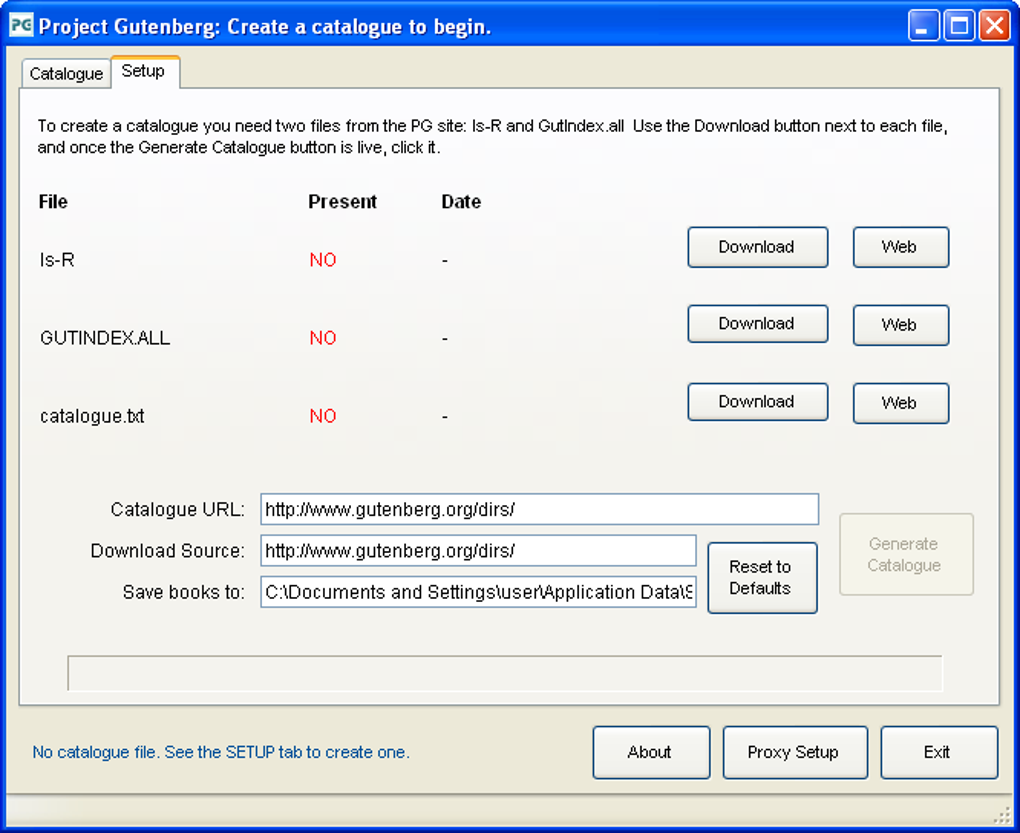
- One‑click download from Project Gutenberg.
- Simple bookmarking system for quick return points.
- Customizable fonts, sizes, and background colours.
- Catalog creation for organising large libraries.
- Auto‑load of the last opened book on startup.
- Lightweight installer (under 5 MB) for fast download.
Installation & First‑Time Setup
Getting yBook up and running is straightforward. Begin by visiting the official yBook download page and clicking the “Download for Windows” (or “Mac” / “Linux”) button. The installer is a standard .exe or .dmg package that guides you through the usual accept‑terms, choose‑install‑location steps. Because the application is free and does not require a license key, you can skip any activation prompts. Once installed, launch yBook from your desktop or start menu. The first launch triggers a brief configuration wizard where you can select your preferred paper colour (off‑white, sepia, or classic white), default font (Serif, Sans‑Serif, or a monospaced option), and the directory you wish yBook to monitor for new e‑books. If you intend to use the Gutenberg shortcut, enable the “Online catalog sync” option, which will automatically pull the latest public‑domain titles into a dedicated menu. After confirming your choices, yBook saves the settings to a hidden configuration file in your user profile, ensuring that every subsequent session opens with your personal preferences intact. Adding a new book is as simple as dragging a supported file onto the main window or pasting a URL into the “Add from Web” field. yBook will parse the source, convert it to its internal rendering format, and instantly display the first page on the familiar paper backdrop.
Compatibility, System Requirements, and Daily Usage Tips
yBook is built with cross‑platform compatibility in mind. Official binaries are available for Windows 7 and newer (both 32‑bit and 64‑bit), macOS 10.12+ (Intel and Apple Silicon via Rosetta 2), and Linux distributions that support the GTK+3 runtime. Mobile versions for Android and iOS are in beta, offering a touch‑optimised interface that retains the same paper‑like rendering engine. Minimum system requirements are modest: a 1 GHz processor, 256 MB of RAM, and at least 50 MB of free disk space for the application itself. Because yBook does not rely on heavy graphics libraries, it runs smoothly on older laptops, netbooks, and even modest tablets.
Everyday Reading Workflow
Once yBook is installed, you’ll quickly discover a workflow that mirrors the rhythm of turning real pages. Start by importing your library—either by pointing the app to a folder that contains your e‑books or by using the built‑in “Download from Gutenberg” feature. The catalog view displays each title as a clickable card, complete with a thumbnail generated from the first page. Selecting a book opens it in the main reading pane, where you can navigate using the space bar, mouse wheel, or simple left‑right arrow clicks. If you need to pause, click the bookmark icon; yBook stores the current location in a plain‑text .bkm file beside the original e‑book, making it easy to share or backup. For longer reading sessions, enable “Night Mode” in the settings to switch the background to a dark gray while preserving the crisp typography. The font‑size slider allows instant scaling without re‑loading the document, which is handy when switching between a laptop screen and a larger monitor. Finally, if you habitually read in short bursts, the “Auto‑load last book” option ensures you always return exactly where you left off, eliminating the need to hunt through your catalog each time you launch the app.
Pros and Cons – A Balanced Look at yBook
Pros
- Free and completely ad‑free, making it ideal for budget‑conscious readers.
- Paper‑style background reduces glare and mimics the tactile feel of a paperback.
- Supports multiple file formats, including older PRC files often ignored by modern readers.
- One‑click Gutenberg integration provides instant access to thousands of public‑domain titles.
- Lightweight installer and low system requirements allow it to run on older hardware.
- Customizable UI (fonts, colours, catalogs) lets users personalize their reading environment.
- Auto‑load of the last opened book saves time for frequent readers.
Cons
- Bookmark system is basic; it does not support notes, highlights, or syncing across devices.
- Stability issues reported on some Windows 10 builds, with occasional crashes when loading large HTML files.
- No native EPUB support yet; users must rely on external converters or the upcoming update.
- Limited annotation features compared with premium competitors like Calibre or Kindle for PC.
- Mobile apps are still in beta and may lack full feature parity with desktop versions.
FAQ – Frequently Asked Questions About yBook
Can yBook open EPUB files?
As of the latest release, yBook does not natively support EPUB. However, the development team has announced improved EPUB handling in an upcoming update, and you can temporarily convert EPUB files to HTML or TXT using free tools like Calibre.
Is yBook safe to download and install?
Yes. yBook is distributed from its official website over HTTPS, and the installer is digitally signed. The application is open‑source, allowing the community to audit the code for security concerns.
How do I sync my bookmarks across multiple devices?
Currently yBook does not include cloud sync. You can manually copy the .bkm files located beside each e‑book to a cloud storage folder (e.g., Dropbox) and open them on another device, but full automatic syncing is planned for a future release.
Does yBook work on Linux distributions?
Yes. A Linux package (AppImage) is provided, which runs on most modern distributions that support GTK+3. Installation is as simple as making the file executable and launching it.
Can I customize the paper background colour?
Absolutely. Within the Settings menu you can choose from preset colours (white, sepia, off‑white) or define a custom RGB value for a truly personalised reading surface.
Conclusion – Should You Download yBook?
If you’re looking for a no‑cost, lightweight e‑book reader that prioritises a paper‑like visual experience, yBook is a strong contender. Its support for multiple formats, seamless Gutenberg integration, and straightforward customisation make it ideal for readers who dislike cluttered interfaces and prefer a classic feel. While the lack of advanced bookmarking, native EPUB support, and occasional stability hiccups keep it from being a universal solution, the upcoming updates promise to address many of these gaps. For students, casual readers, or anyone who values speed and simplicity over extensive library management, downloading yBook today offers an immediate boost to your digital reading workflow. Click the button below to get the latest version and start turning virtual pages with the comfort of a paperback in hand.
Guides & Tutorials
How to install yBook
- Click the Download button above.
- Once redirected, accept the terms and click Install.
- Wait for the yBook download to finish on your device.
How to use yBook
This software is primarily used for its core features described above. Open the app after installation to explore its capabilities.
User Reviews
No reviews yet. Be the first to share your experience.
You may also like
more
Llama 2
Free-to-use large language model As the new addition to Meta’s arsenal of langua...

NotebookLM
Revolutionizing the note-taking and idea-generation process NotebookLM is an exp...

Github co pilot
AI-inspired software development and coding platform GitHub Copilot is a browser...

Google Gemma
Google’s lightweight AI models Introducing Google Gemma , a family of cutting-ed...

AI Image Enlarger
A free app for Windows, by ai-image-larger. AI Image Enlarger is a free software...

DALL E
AI-driven text-to-image transformation engine DALL·E is a free graphic and desig...